Overview
We’ve introduced the ability to create Blocked Slots in Rentals, giving you more control over your inventory without needing to create a customer booking.
You can now block time for listings to account for maintenance, internal use, or offline commitments, ensuring availability stays accurate across your calendar and booking flows.
What’s New
- Create blocked slots for rental listings.
- Blocked slots reduce availability just like a booking, but aren’t tied to a customer or order.
- Optionally block specific variants and quantities (if enabled).
- View, edit, and delete blocked slots easily from the Calendar View.
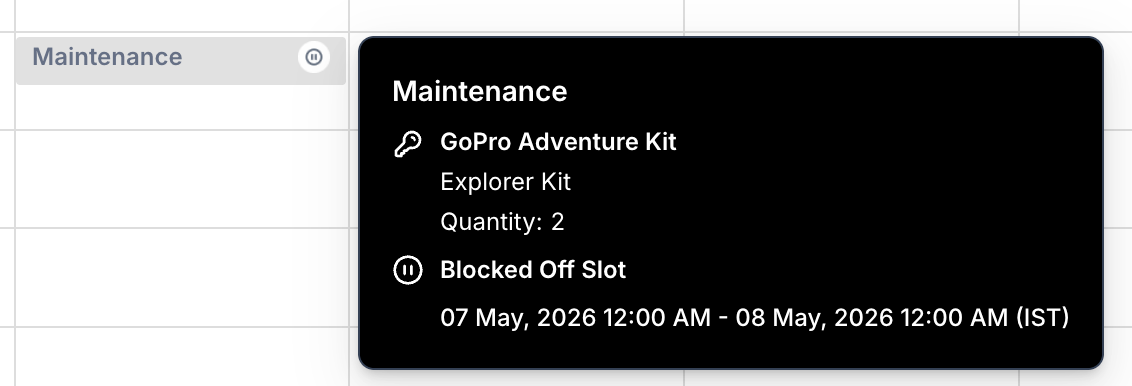
- Blocked slots are clearly visible in the calendar with relevant details.
How It Works
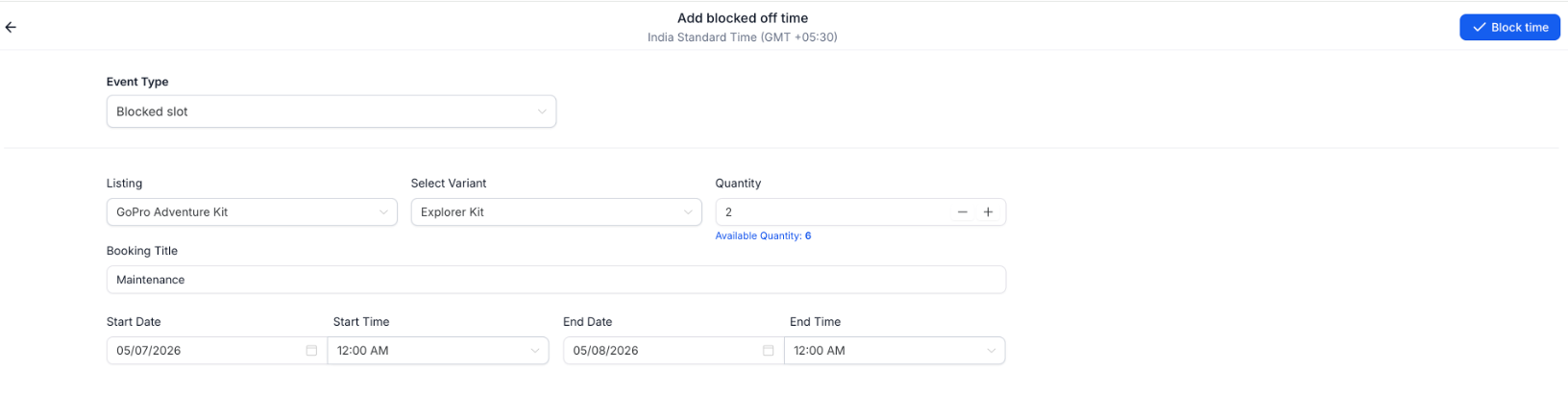
Set the Event type as "Blocked slot" while creating a new booking
Create a blocked slot by selecting:
- Listing
- Date & time range
- Optional variant and quantity (if applicable)
Once created:
- The listing becomes unavailable for the selected duration
- Availability is updated across booking flows
You can:
- View details of the blocked slot
- Edit it using the same form
- Delete it to instantly release availability
Why This Matters
- Helps manage inventory beyond customer bookings.
- Ensures accurate availability across all booking channels.
- Supports real-world scenarios like maintenance, holds, or internal usage.
- Gives you more flexibility and control over rental operations.
Was this article helpful?
That’s Great!
Thank you for your feedback
Sorry! We couldn't be helpful
Thank you for your feedback
Feedback sent
We appreciate your effort and will try to fix the article